Tutorial for R users
In this tutorial we will enrich Acropora digitifera observations with bathymetry information. Please make sure you already followed the installation instructions.
Here is a summary of the main steps:
Loading your dataset and giving it a name (called reference here).
Performing data enrichment by specifying your dataset reference, the environmental variable you need, etc.
Exporting the downloaded data to the format you require.
1. Load your occurrence data
First import all functions from geoenrich
[ ]:
library(reticulate)

os <- import("os")
dataloader <- import("geoenrich.dataloader", convert=FALSE)
enrichment <- import("geoenrich.enrichment", convert=FALSE)
exports <- import("geoenrich.exports", convert=FALSE)
Three input formats are accepted. You can follow the instructions that match your format:
A. DarwinCore archive
A DarwinCore archive is bundled into the package for user testing (GBIF Occurrence Download 10.15468/dl.megb8n). If you don’t have a dataset and you don’t want to register to GBIF yet you can use this one.
[3]:
example_path <- paste( os$path$split(dataloader$'__file__')[[1]],
                      '/data/AcDigitifera.zip', sep = '')
geodf <- dataloader$open_dwca(path = example_path)
B. Georeferenced points (csv format)
Fill in the path to your csv and the compulsory column names.
[ ]:
geodf <- dataloader$import_occurrences_csv( path = '', id_col = '', date_col = '',
                                            lat_col = '', lon_col = '')
C. Area bounds (csv format)
See documentation for information about input file format.
[ ]:
example_path <- paste( os$path$split(dataloader$'__file__')[[1]] ,
                      '/data/areas.csv', sep = '')
geodf <- dataloader$load_areas_file(example_path)
For all formats: Choose a dataset reference and associate it to your dataset
[ ]:
dataset_ref <- 'ac_digitifera'
enrichment$create_enrichment_file(geodf, dataset_ref)
2. Enrich
Define enrichment scope
var_id: Pick a variable id from the catalog
geo_buff: the buffer around the occurences (in kilometers). Choose 0 to obtain nearest values.
time_buff: Choose a temporal buffer. In this case we download data from 7 days before the occurrence date, to the occurrence date. time_buff is only used for variables that have a time dimension
[ ]:
var_id <- 'bathymetry'
dataset_ref <- 'ac_digitifera'
geo_buff <- 115
time_buff <- c(-7L, 0L)
Start enrichment
The slice argument allows you to only run the enrichment on a subset of the points.
[ ]:
enrichment$enrich(dataset_ref, var_id, geo_buff,
                  time_buff, slice = c(0L,100L))
Check the enrichment progress
[ ]:
enrichment$enrichment_status(dataset_ref)
3. Retrieve and export downloaded data
Select the dataset reference and the variable that you want to export. Then you can choose one of four options:
[ ]:
dataset_ref <- 'ac_digitifera'
var_id <- 'bathymetry'
A. Export variable statistics for the whole dataset
[9]:
exports$produce_stats(dataset_ref, var_id, out_path = './')
B. Export data as a raster layer for a given occurrence
[ ]:
ids <- py_to_r(enrichment$read_ids(dataset_ref))
occ_id <- ids[[1]] # first occurrence of the dataset

exports$export_raster(dataset_ref, occ_id, var_id, path = './')
C. Export data as a png file for a given occurrence
[ ]:
ids <- py_to_r(enrichment$read_ids(dataset_ref))
occ_id <- ids[[1]] # first occurrence of the dataset

exports$export_png(dataset_ref, occ_id, var_id, path = './')
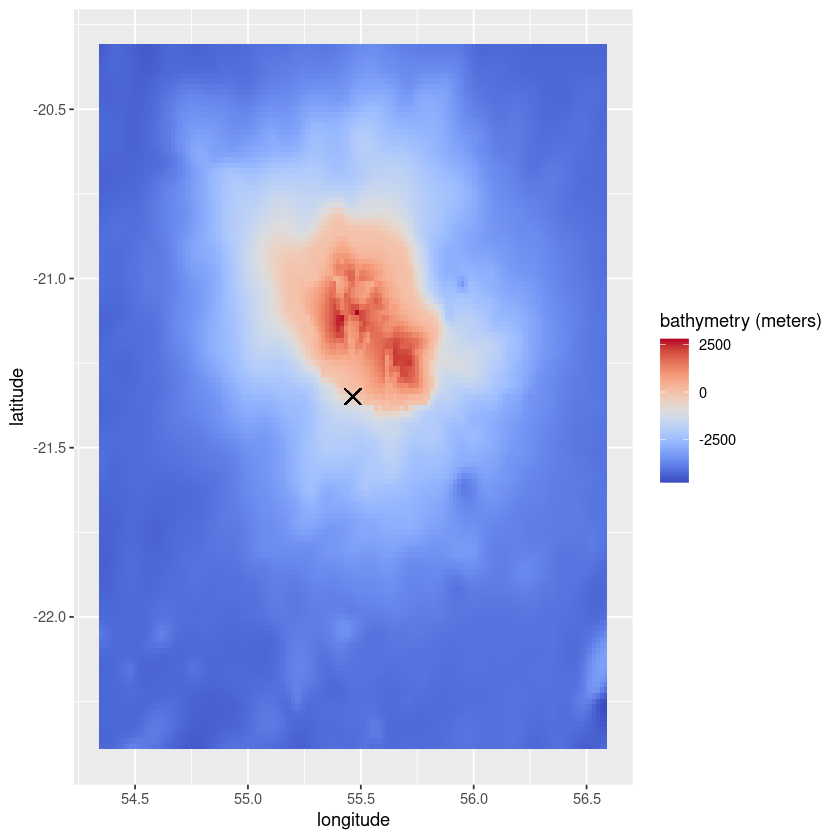
D. Retrieve the raw data (and plot it)
Required libraries: ggplot2, reshape2, sf, pals
[ ]:
library(ggplot2)
library(reshape2)
library(sf)
library(pals)
[ ]:
# Select an idea from the dataset

ids <- enrichment$read_ids(dataset_ref)
occ_id <- ids[[1]] # first occurrence of the dataset


output <- exports$retrieve_data(dataset_ref, occ_id, var_id, shape = 'buffer')

data <- py_to_r(output[["values"]])
unit <- output$unit
coords <- py_to_r(output[["coords"]])

# Retrieve coordinates
for (c in coords){
    if (c[[1]] == 'latitude'){
        lats = c[[2]]}
    if (c[[1]] == 'longitude'){
        longs = c[[2]]}}

# Retrieve coordinates of the occurrence
occurrences <- read.csv(file = paste(enrichment$biodiv_path, '/', dataset_ref,  '.csv', sep = ''), row.names = 1)
occ_point <- st_coordinates(st_as_sf(occurrences[as.character(occ_id),], wkt = 'geometry'))
[15]:
colnames(data) <- longs
rownames(data) <- lats
data_df <- melt(data)
colnames(data_df) <- c('latitude', 'longitude', var_id)
title <- paste(var_id, ' (', unit, ')', sep = '')
ggplot(data = data_df, aes(x=longitude, y=latitude, fill=eval(as.name(var_id)))) +
       geom_tile()+
       scale_fill_gradientn(title,colours=coolwarm(100), guide = "colourbar")+
       geom_point(aes(x=occ_point[[1]], y=occ_point[[2]]), shape=4, size = 4)